Appearance
Widgets - Main Script & Init Call
Main Script
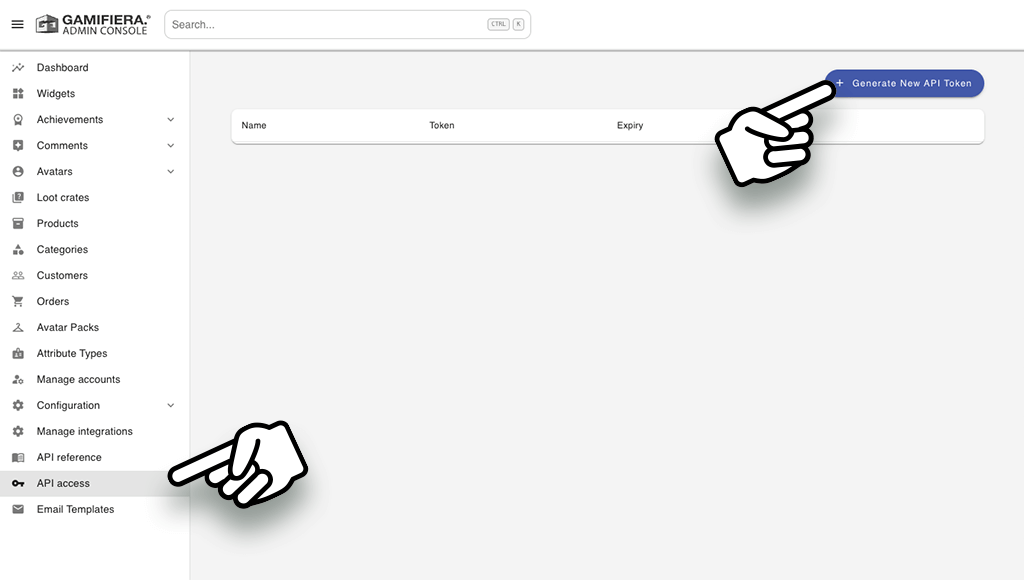
Create an API token
Log in to your admin account at admin.gamifiera.com and navigate to API-access in the main menu to generate a new API token.
Add the main script to your site
Add Gamifiera's main script to your site. This part is a requirement for all widget functionality and is made one time only.
- If the customer is logged in, send CustomerToken which you collect in the Gamifiera API.
- If the customer is not logged in, send
nullor remove the row withCustomerTokencompletely. - Set the appropriate locale for your site's language.
html
<script>
	window.gmf = function() {
		(window._gmf = window._gmf || []).push(Object.values(arguments));
	};

    var s = document.createElement("script");
    s.type = "text/javascript";
    s.src = "https://cdn.gamifiera.com/static/gmf/loader.js";
    s.async = true;
    document.head.appendChild(s);

    gmf('init', {
    	merchantId: xxxx,
    	locale: 'sv_SE',
    	customerToken: 'CUSTOMER_TOKEN', // <--------- Replace CUSTOMER_TOKEN with an actual customer token
    });
</script>
Make sure to replace merchantId, locale for language and insert actual customer token
⚠️ Warning:
API key will give you full access to the API, so be sure to keep it secure! Do not share your API Key in publicly accessiable places such as your git repo, client-side code etc.